Printing an AI design on clothing: here's how to make a good print file
13 October 2026 · 6 min leestijd · DrukkerijNijmegen.com
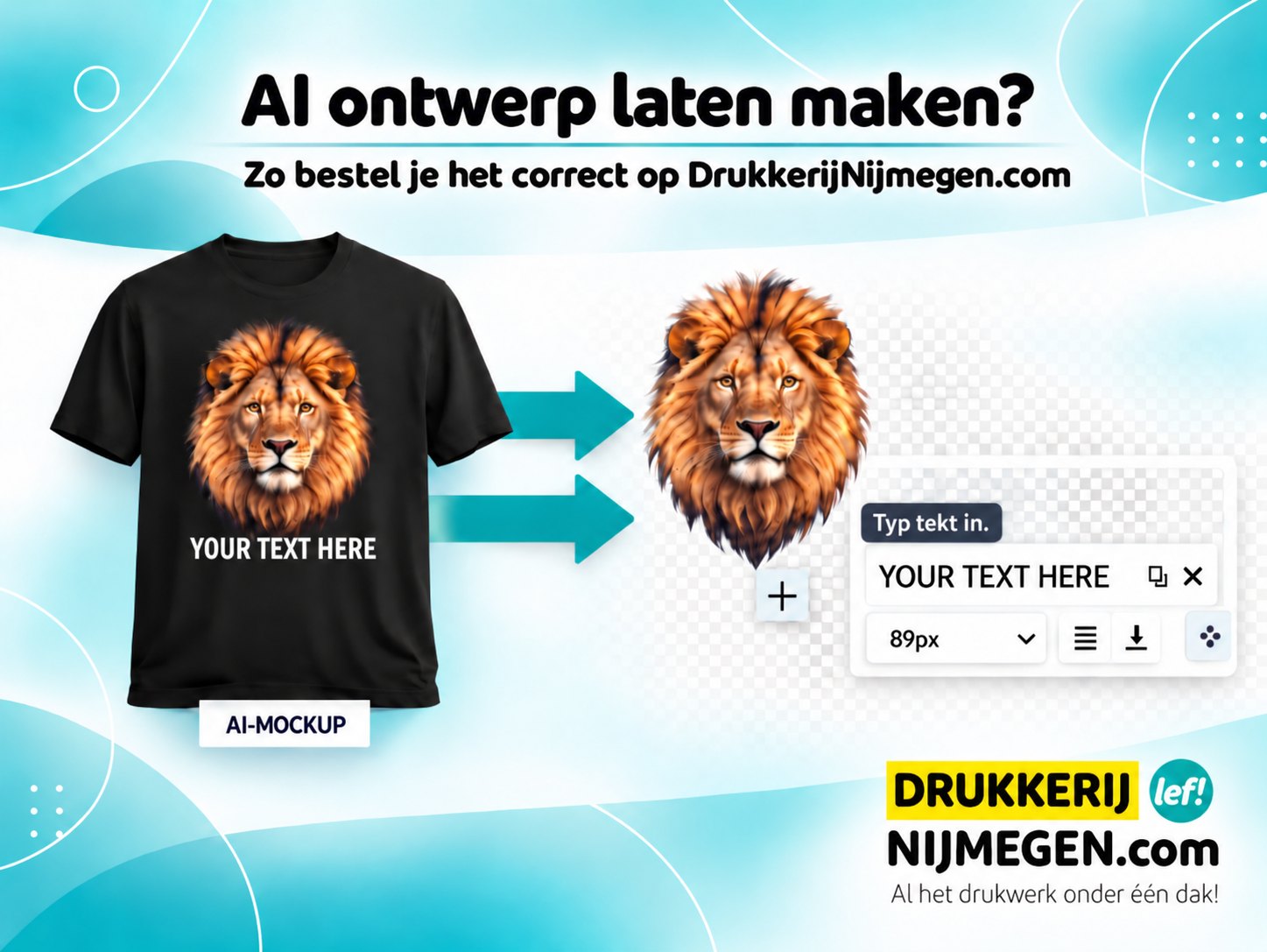
Short answer: an image of a shirt with your design on it (an AI mock-up) is not something we can print. What we need is the print itself: separate, flat, sharp and preferably on a transparent background. Below you can read how to get that from ChatGPT, Gemini, Midjourney, Canva or another AI tool in a few steps, and how to order it with us afterwards.
Why an AI mock-up isn't a print-ready file
A mock-up is a photo of a garment. It has folds, shadow and light in it, the print is at an angle or follows the fabric, and the background is the shirt itself. If we were to print that, you'd be printing a photo of a shirt onto a shirt. What we need is the design as it will appear on the fabric: straight-on, without a garment around it.
What AI shows you, but can't be printed
AI makes everything look good. A mock-up often shows a print that runs right across everything: over the seams, into the collar, around the sleeve or across the pockets. Or the garment suddenly gets a collar in a different colour or contrasting buttons. On screen that looks lovely, but much of it is technically not possible to print.
- We print within the panels. A print stays within the seams and away from the collar, cuffs, button placket, zips and pockets. Over a seam or into a collar, the print won't adhere properly and will crack when worn and washed.
- No continuous all-over print. A design that runs all the way around the garment, from front to back or over the sleeves, isn't something we can make. We print per location, such as chest, back or sleeve, each with its own maximum size.
- The garment is as shown in the webshop. The colour of the collar, the buttons, the stitching and the fit are part of the product. We can't add a collar in a different colour or different buttons.
- So choose the garment in the webshop. Use AI for the design itself, not for the shirt. For each product you can see the colours and the locations where we can print.
Not sure whether your idea will work? You'll first get a digital proof from us, so you can see what it will really look like before we start printing.
How to create a print-ready AI design
1. Ask for just the print
Explicitly state in your prompt that you don't want a shirt, model or background. Already have a mock-up you like? Then ask: "Turn this print into a standalone design, straight-on, without a garment."
2. Choose a transparent background
Ask for a PNG with a transparent background. Watch out for a common pitfall: some tools draw a grey-and-white chequerboard pattern into the image to look transparent, but it isn't actually transparent. That chequerboard pattern will then be printed along with it. Not sure? Open the file on a dark background: if you can still see the chequerboard, it's fake.
3. Think about the technique in advance
- Lots of colours, gradients or a photo-like design (like the lion above): we print that with DTF in full colour, even on dark shirts.
- Text, a logo or a design in one or two flat colours: that can be done with flex or cut vinyl. Ask the AI for "flat colours, no gradient, no shadow, thick lines". That gives a crisper result.
You can read more about the difference in DTF or flex vinyl.
4. Be careful with text in the image
AI tools still often make mistakes with text: one letter too many, an odd squiggle, or a word that's just slightly off. Check every letter. Is it about regular text, such as a name, date or slogan? Then leave that out of the AI image and put the text you want in the comments field with your order.
5. Make sure there are enough pixels
An AI image is often 1024 pixels wide. That's enough for a small logo on the chest, but tight for a large print on the back. Ask the tool for the largest size it can make, or use the "enlarge/upscale" button. When uploading, you'll immediately see whether the quality is good enough for a small or a large logo.
6. Check the design for AI glitches
Zoom in and look at hands, eyes, edges and small details. Also watch out for a white edge around the design: on a black shirt that becomes a visible border. And don't use brand names, logos or well-known characters belonging to others: we're not permitted to print those without authorisation.
Ordering from Drukkerij Nijmegen
- Choose your garment, colour and sizes in the webshop.
- Upload your PNG at the position where the print should go, for example chest or back.
- Put in the comments field what we need to know: the desired width in centimetres, any accompanying text, or "exactly like the mock-up".
- You'll first receive a digital proof. Only after your approval will we start pressing, in our own workshop at Betouwstraat 40 in Nijmegen.
This is possible from as little as 1 item. Can't manage to get a good file out of the AI tool? Send us a WhatsApp message with what you have: we'll take a look with you.
Handy prompt to copy
"Create a standalone design for a T-shirt print: [your idea]. Just the design, straight-on, without a garment, model or background. Transparent background, PNG, as large as possible, sharp edges, no shadow underneath the design."
For a crisp design in one or two colours, add: "flat colours, no gradient, thick lines, maximum two colours."
Frequently asked questions
Can I have an AI design printed on a black shirt?
Yes. With DTF we also print on dark textiles. Just make sure you have a genuinely transparent background, otherwise a white or coloured block will appear around your design.
Can I just have any AI image printed?
The design must be yours, or you must have permission to use it. We don't print brand logos, well-known cartoon characters and the like.
My AI image isn't sharp enough. What now?
Ask the tool for a larger version or use the upscale button. If that doesn't work, send it to us: we'll see what's possible.
Can the print run over the seams or into the collar?
No. We print within the panels of the garment, up to the seams. Over seams, collars, cuffs, button plackets and pockets, a print won't adhere properly. An AI mock-up sometimes shows that, but it can't be printed.
Can the collar or buttons be a different colour, like in my AI image?
No. The garment is as shown in the webshop, with the matching colour of collar, buttons and stitching. We add the print; we don't alter the garment itself.