Printing on clothing · from 1 piece · In de Betouwstraat 40, Nijmegen
Having an AI design printed on clothing
Made a design with ChatGPT, Gemini, Midjourney or Canva? We'd love to print it on your T-shirt, hoodie or bag. Here's how to turn an AI image into a proper print file, so it looks just as good on the fabric as it does on your screen.
First things first
An AI mock-up is not a print file
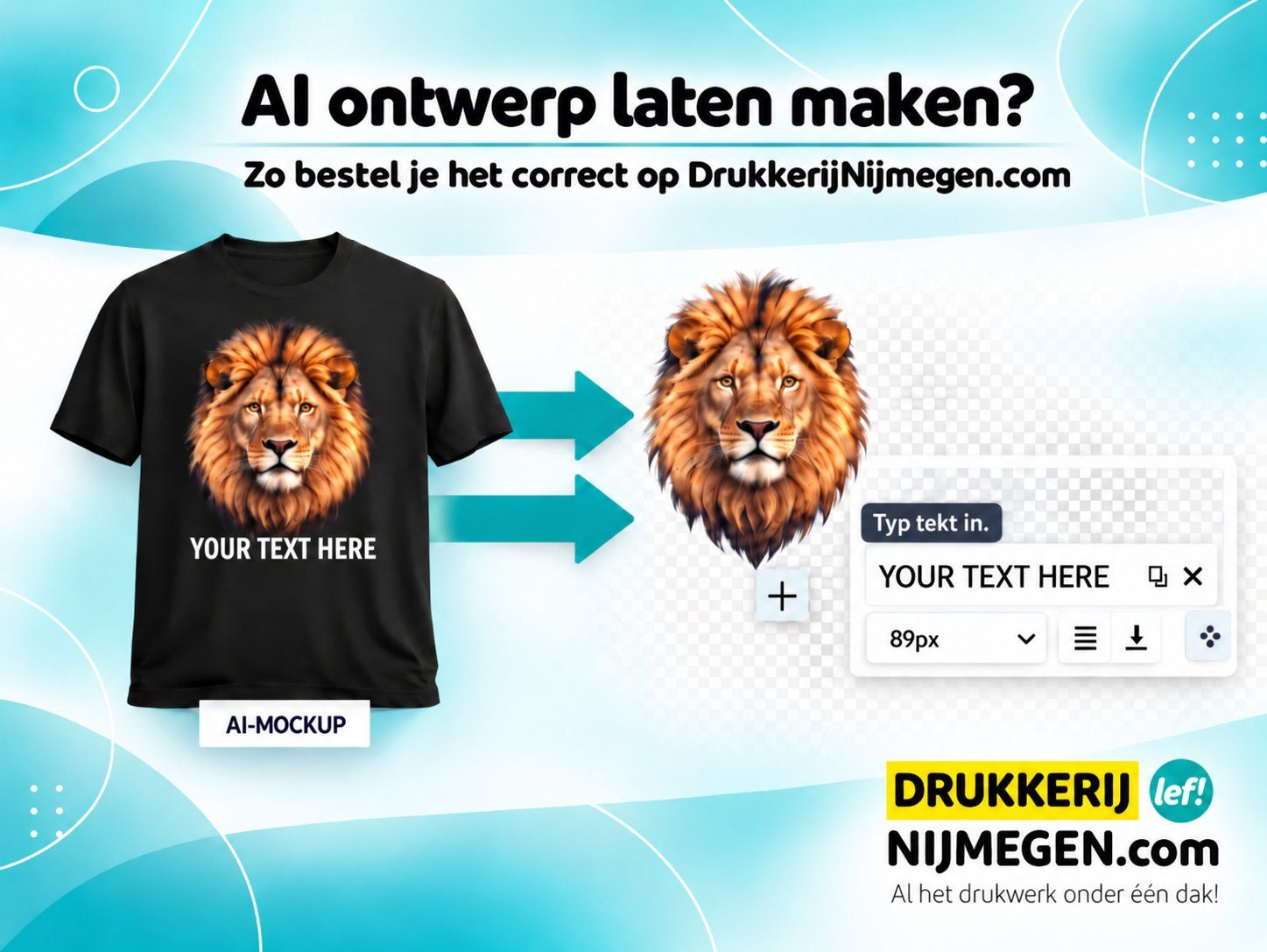
A mock-up is a photo of a garment with your design on it: complete with folds, shadow and light, with the print following the fabric. If we were to print that, you'd be printing a photo of a shirt onto a shirt. What we need is just the print itself: standalone, straight-on, sharp and preferably on a transparent background.
AI makes everything look great, but not everything can be printed
AI makes everything look great. A mockup often shows a print that runs right across the garment: over the seams, into the collar, around the sleeve or across the pockets. Or the garment suddenly gets a little collar in a different colour or contrasting buttons. On screen it looks fantastic, but much of this simply can't be printed in practice.
- We print within the panels. A print stays within the seams and away from the collar, cuffs, button placket, zips and pockets. Over a seam or on a collar, the print won't adhere properly and will crack when worn and washed.
- No continuous all-over print. We can't produce a design that wraps all the way around the garment, from front to back or across the sleeves. We print per location, such as the chest, back or sleeve, each with its own maximum size.
- The garment is as shown in the webshop. The colour of the collar, the buttons, the stitching and the fit are part of the product. We can't add a collar in a different colour or different buttons.
- So choose the garment in the webshop. Use AI for the design itself, not for the shirt. For each product, you can see the colours and the locations where we can print.
Not sure whether your idea is possible? We'll first send you a digital proof, so you can see exactly how it will turn out before we start printing.
How to make it print-ready
Six steps from AI image to print file
Ask for the print only
State in your prompt that you don't want a shirt, model or background. Already have a mock-up? Then ask: "turn this print into a standalone design, straight-on, without the garment".
Choose a transparent background
Ask for a PNG with a transparent background. Watch out for a fake chequerboard: some tools draw the grey-and-white checked pattern into the image itself. If you still see it against a dark background, it isn't really transparent.
Think about the technique
Lots of colours, gradients or photo-like detail: that calls for full-colour DTF. Text or a logo in one or two solid colours can be done with flex or cut vinyl; in that case, ask the AI for flat colours without gradients.
Be careful with text
AI still often makes mistakes with letters. Check every letter, or leave ordinary text (name, date, slogan) out of the image and add it in the comments field when you place your order.
Make sure you have enough pixels
An AI image is often 1024 pixels wide: enough for a chest print, tight for a back print. Ask for the largest size or use the upscale button. When you upload it, you'll see straight away whether it's good enough.
Check for AI glitches
Zoom in on hands, eyes and edges. Watch out for a white edge around the design: you'll notice it on a black shirt. And don't use brand logos or well-known characters belonging to others.
A prompt you can copy
Paste this into your AI tool and fill in your own idea:
"Create a standalone design for a T-shirt print: [your idea]. Just the design, straight-on, without a garment, model or background. Transparent background, PNG, as large as possible, sharp edges, no shadow beneath the design."
Want a clean design in one or two colours, for example for team wear or workwear? Then add: "flat colours, no gradients, thick lines, maximum two colours."
Curious which technique suits your design? Read DTF or flex vinyl: which print technique suits your clothing?
Ordering
How to order your AI design at Drukkerij Nijmegen
Choose your garment
Choose the T-shirt, hoodie or bag, the colour and the sizes in the webshop.
Upload per position
Upload your PNG at the spot where the print should go, for example the chest or back. You'll see straight away whether the quality is good enough for a small or a large logo.
Tell us what we need to know
In the comments field, state the desired width in centimetres, any accompanying text, or "exactly like the mock-up".
A digital proof first
You first receive a digital proof. We only start printing after your approval, in our own workshop in Nijmegen.
Frequently asked questions about printing AI designs
Can you print an AI design on clothing?
Yes. At Drukkerij Nijmegen we print designs from ChatGPT, Gemini, Midjourney, Canva and other AI tools onto T-shirts, hoodies, bags and more, from just 1 piece. We do need the standalone print though, not an image of a shirt with the design on it.
Can I have an AI design printed on a black shirt?
Yes. With DTF we also print on dark textiles, in full colour. Just make sure you have a genuinely transparent background, otherwise a white or coloured patch will appear around your design.
Which file should I supply?
Preferably a PNG with a transparent background, as large as possible. A vector file (SVG, PDF, AI or EPS) is even better, but most AI tools produce a PNG, and we can work well with that.
Can I just have any AI image printed?
The design must be yours, or you must have permission to use it. We don't print brand logos or well-known cartoon characters.
My AI image isn't sharp enough. What now?
Ask the tool for a larger version or use the upscale button. Doesn't work? Send it to us, and we'll see what's possible.
Can the print run across the seams or into the collar?
No. We print within the panels of the garment, up to the seams. Over seams, collars, cuffs, button plackets and pockets, a print won't adhere properly. An AI mockup sometimes shows this, but it can't actually be printed.
Can the collar or buttons be a different colour, like in my AI image?
No. The garment is as shown in the webshop, with the colour of the collar, buttons and stitching that belongs to it. We add the print; we don't alter the garment itself.
Can't figure it out?
Send us what you have, we'll take a look
Not managing to get a good file out of the AI tool? Send us your image or mock-up, and we'll work out together what's needed to print it beautifully.